
Settings : Upload Compliance Documents
Here's how to upload the licensing and insurance paperwork that lets you bid.
Step 1 — Open Settings → Company, scroll to Company Documentation
There are four upload slots, each with a 5MB limit: General Liability Insurance, Business License, W9, and Additional Document for Review.
Your compliance documents must be approved before you can bid on an opportunity, not just before a Block is awarded. Upload them early.
Step 2 — Click a slot and select a file
Clicking a slot opens your file picker straight away. There's no separate confirm step, selecting the file uploads it.
Step 3 — Confirm the upload
Your file appears in a row above the slots with a "Pending" badge and a "View" link. Our team reviews uploads within 2 days. You'll be notified when a document is approved, or if we need a different version.
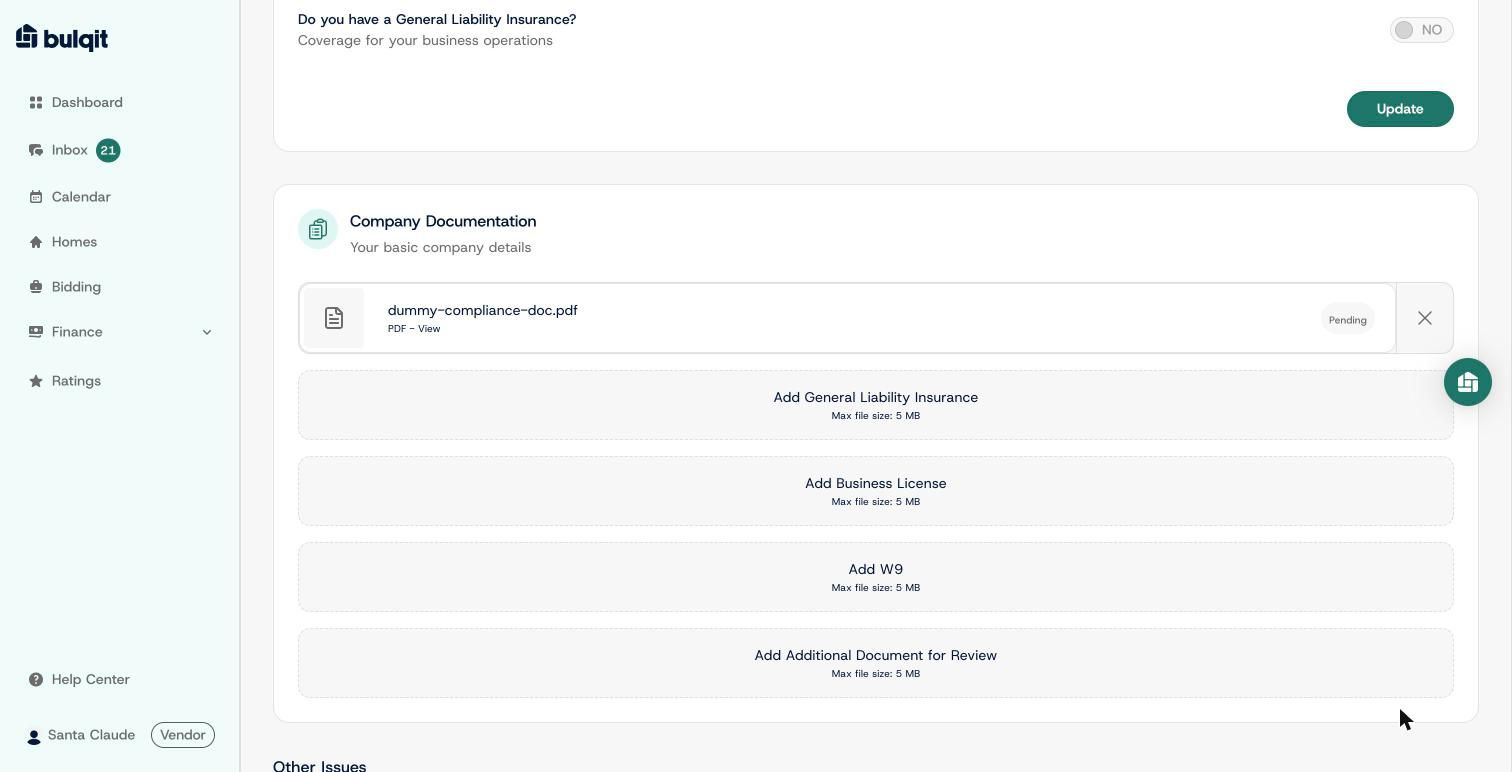
A file uploaded to the Additional Document for Review slot, showing Pending status