
Homes : Read Vendor Instructions for a Job
Here's where to find the access notes a Member has left for you — gate codes, pet warnings, where the equipment lives.
Step 1 — Find the home
Three routes get you there: the Homes list, a job card on your Calendar, or the Details button in an Inbox thread. All three open the same home panel.
Step 2 — Open the Home Info tab
The panel has three tabs — Home Info, Schedule, and History. Home Info opens by default, and that's where the access notes live.
Step 3 — Read Vendor Instructions and Scope of Work
Vendor Instructions is the Member's own note to you, shown in full. For example: "Gate code is."Please close the gate behind you, friendly dog on the property."
Scope of Work sits directly below and describes the contracted service itself — for example, "Professional hanging of holiday lights along rooflines, gutters, and outdoor trees." This is what you agreed to deliver when the Block was awarded.
Check both before every visit. Instructions change.
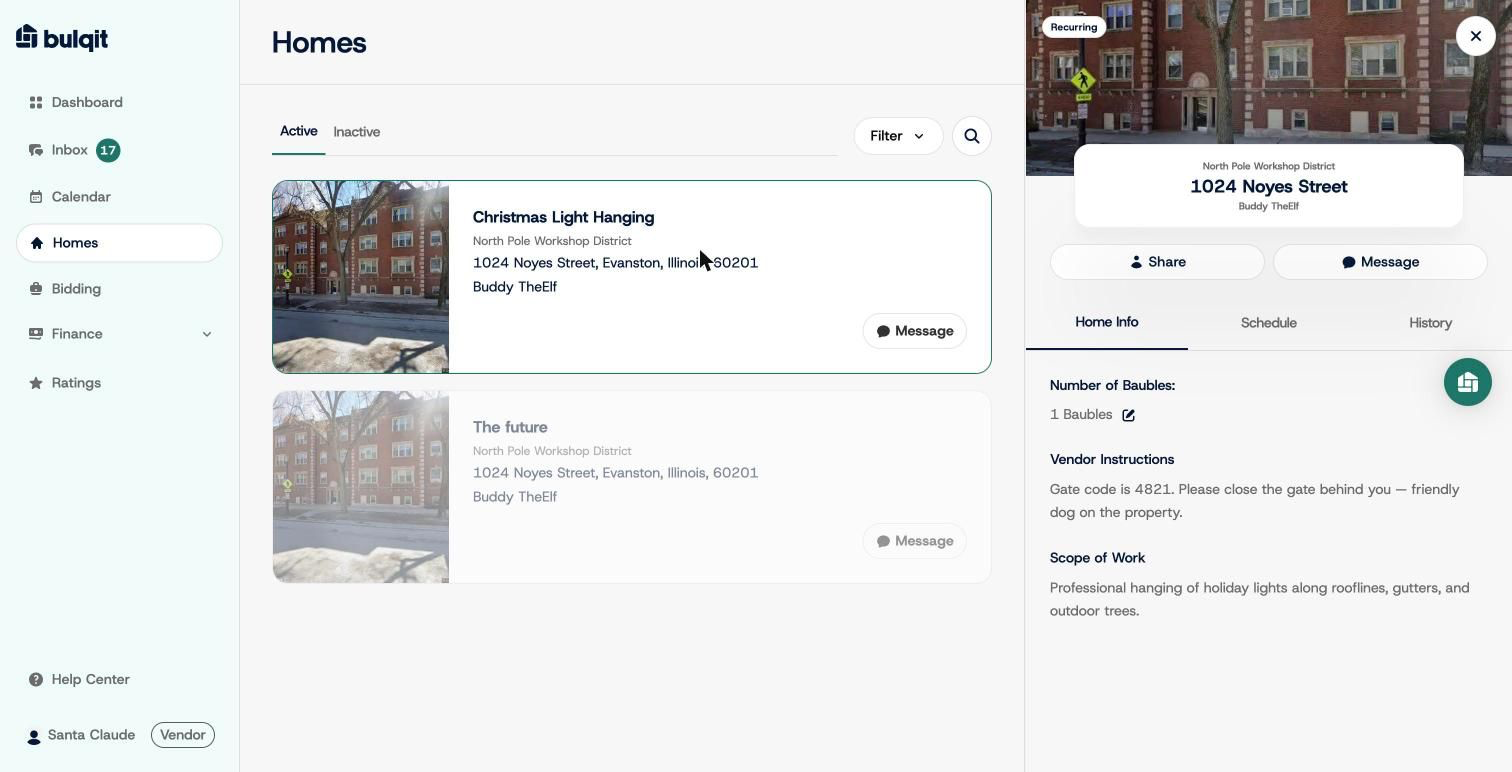
Home Info tab showing Vendor Instructions and Scope of Work
If instructions are missing or you can't get access on site, message the Member from the job card. If you still can't reach them, contact Bulqit Help before marking the job complete.